Todoist: To Do List & Calendar
- 4.6
- Rating
- 10.00M
- Installs
- Free
- Price

 Analysis by App-foxy
I use task managers when my head feels crowded, but I have learned that a long feature list is not enough to make one trustworthy. A productivity app becomes part of my daily routine: I put work deadlines, personal errands, ideas, and sometimes sensitive notes inside it. That is why my review of Todoist: To Do List & Calendar is less about calling it “powerful” and more about whether its organization tools feel understandable and manageable in ordinary use.
Todoist is a free productivity app from Todoist Inc. It has been available since November 18, 2012, and its Android listing shows an average rating of 4.6 from around 304 thousand ratings, with over 10 million installs. Those figures suggest that it has become a familiar choice rather than a niche experiment, but popularity alone does not tell me whether it is the right place for my own information. I look at how easily I can control what I create, what I share, and how much structure I really need.
What makes Todoist feel dependable in daily use
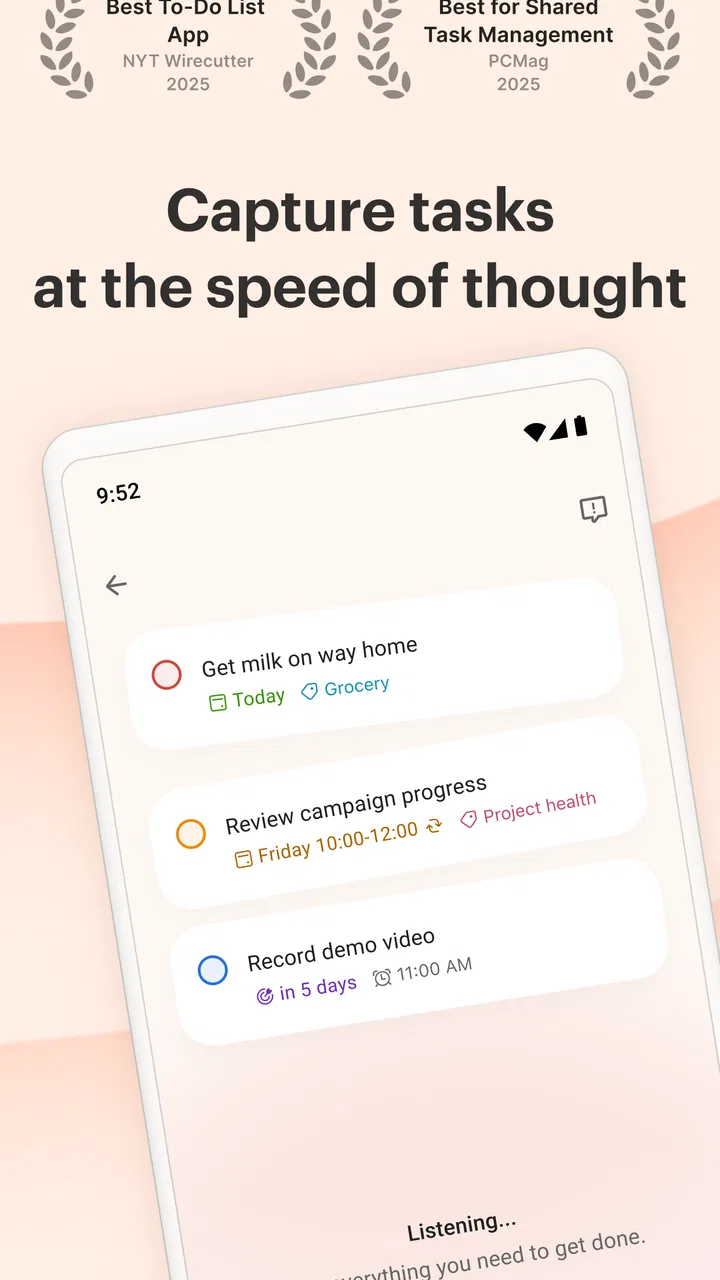
The first thing I noticed is that Todoist does not force me to begin with a complicated planning system. I can open it, write a task, and move on. That sounds basic, but it matters when I am standing in a supermarket trying to remember three things, or when an idea arrives while I am walking between meetings. The option to capture ideas by voice is particularly useful in those moments because it reduces the temptation to postpone recording something until I have time to type it properly.
You May Also Like

 Blood Strike: 2.5 Anniversary
Blood Strike’s Loadouts Turn Every Drop Into a Tactical Gamble
A close look at Blood Strike’s custom loadouts: how fast access to signature weapons reshapes its battle royale rhythm, rewards preparation, and narrows the gap between fights.

 Pandora - Music & Podcasts
Pandora’s Music Is Easy to Start, but Harder to Recover
Pandora’s strength is its low-effort path from a seed to a station. Its weak spot is how much confidence it asks you to place in connection, setup, and quiet recovery.

 8 Ball Pool
 Is Built on Rivalries, Rematches, and Routine
A close look at the rivalries, rematches, shared routines, and unanswered safety questions that turn a quick pool match into a persistent mobile community.

 Samsung Music
’s Quiet Strength Is Playing What You Already Own
Its reach comes less from spectacle than from dependable access to a personal library. That simplicity is both the app’s strongest retention engine and its ceiling.

 AccuWeather: Weather Radar
AccuWeather Review: A Quick, Clear Forecast for Everyday Decisions
For everyday plans, the best forecast is the one you can understand quickly. AccuWeather makes rain timing, radar, and local conditions easy to act on, with a few trade-offs.

 Hill Climb Racing
Why Hill Climb Racing Still Turns Crashes Into One More Run
A tiny car, a bumpy hill and one more upgrade: Hill Climb Racing keeps resurfacing because its simple chaos makes every near-miss feel personal.
More From Our News Desk
View All News


At the same time, the app can grow with a more deliberate workflow. Tasks can be arranged into projects, given due dates, and organized so that a large responsibility becomes a sequence of smaller actions. I find that useful for work that has a clear finish line but many moving parts. Instead of writing “prepare the presentation” and leaving it untouched, I can separate research, outline, draft, review, and final preparation. The benefit is not that the app does the thinking for me; it makes unfinished thinking visible.
That distinction is important for trust. A task manager should not pretend to know what matters most in my life. Todoist works better when I treat it as a clear external memory, not as an automatic life manager. I decide the project names, the deadlines, and the people who need access. The app gives those decisions a place to live.
Its age rating is Everyone, which makes the interface approachable for a broad audience. I would still be careful about what I write in any cloud-based productivity service, especially if a task contains private work details, access information, or personal records. An age rating describes suitability of the app’s content; it is not a reason to treat every note as harmless.
Starting small prevents the app from becoming another chore
My preferred way to begin is with one inbox-like stream of quick tasks rather than building a perfect hierarchy on the first day. I capture everything there, then process it at a fixed point in the day. A short review is enough to decide whether an item belongs in a project, needs a date, or should be deleted. This workflow is more reliable than creating several projects and labels before I have established a habit of returning to them.
A useful, less obvious trade-off is that organization creates maintenance. Every project, date, and priority adds clarity only if I keep it current. If I assign dates to tasks merely to make the list look tidy, the schedule soon becomes a pile of overdue reminders. Todoist is strongest for people willing to review their tasks regularly. Someone who wants a completely automatic planner may find this level of personal responsibility tiring.
I also like separating “must happen on a particular day” from “would be good to do soon.” That small distinction keeps the calendar from becoming a false promise. A task such as renewing a document may deserve a real date, while reading background material may belong in a project without pretending that Tuesday is the only possible day. Todoist gives me room to make that judgment, but it does not make the judgment for me.
Voice capture is helpful, but processing still matters
Voice entry is most valuable when speed matters more than polish. I can record a rough thought before it disappears, then clean it up later. I would not rely on a spoken capture as the final wording of an important task, though. Names, unusual terms, and multiple actions can be misunderstood or left too vague. The best pattern is capture first, edit during review.
For example, saying “call the contractor about the leak and ask for the invoice” contains at least two actions. If I leave it as one crowded sentence, completing half of it may create confusion. I get better results by turning it into a clear call task and a separate follow-up task. This is a small habit, but it is one of the practical differences between merely collecting reminders and actually managing them.
Another useful approach is to write tasks as visible next actions. “Plan holiday” is a project description, not a helpful next step. “Check passport expiry” or “compare two travel dates” gives me something I can do immediately. Todoist becomes more effective when I use it to remove ambiguity, not just to store broad intentions.
Projects and teamwork require deliberate boundaries
The teamwork side is useful when several people need to stay aligned without sending a stream of messages. A shared project can give everyone a common view of responsibilities and progress. I would use it for a small event, a household move, or a work deliverable where tasks are easier to follow than a long conversation.
However, shared visibility changes the privacy question. Before adding a task to a team project, I ask whether every participant needs to see the full wording. “Book a meeting with the supplier” may be appropriate; a note containing private negotiation details may not be. I prefer to keep sensitive context in a separate, personal task and place only the necessary action in the shared space.
This is also where account controls and user choices matter more than a polished interface. I want to know which project I am sharing, who needs access, and whether a task is personal or collaborative before I press the relevant control. I avoid treating a shared workspace as a private notebook. That habit protects me from accidental oversharing regardless of which productivity service I use.
Todoist is not automatically the best substitute for every team’s communication system. If a group needs detailed discussion, document editing, formal approvals, or a full record of decisions, a dedicated collaboration platform may be better. Todoist’s advantage is keeping responsibilities visible and actionable; it is less suitable as the only home for complex project documentation.
Data-sensitive moments deserve extra attention
The most sensitive moment is often not account creation but everyday capture. Voice input, quick notes, and shared tasks make it easy to enter information before thinking about its audience. I try to pause when a task includes a customer name, a medical detail, a financial matter, or an internal work reference. If the task can be written in neutral terms, I do that. If it cannot, I consider whether a task manager is the appropriate place at all.
I also avoid putting passwords, recovery codes, payment details, or full identity information into task text. A reminder such as “update billing details through the official account page” is safer and more useful than pasting the details themselves. This is not a special Todoist trick; it is a sensible boundary for any app that stores personal content.
When using voice capture, I pay attention to where I am. Recording a private thought at home is different from speaking work information in a crowded room. The convenience of hands-free entry should not override basic awareness of the surroundings. I like the feature, but I use it as a capture shortcut rather than a reason to say everything aloud anywhere.
For accounts used with other people, I recommend a simple separation: personal planning stays in personal projects, and shared work stays in projects created specifically for collaboration. Mixing the two makes it harder to understand what others can see and increases the chance that a private reminder will be placed in the wrong area. Clear project names help, but a quick check before sharing is still worthwhile.
Where the free plan fits, and where costs enter the decision
The app is free to download and use, which makes it easy to test without committing money at the start. In-app purchases range from $0.99 to $149.99 per item, so I would examine the exact upgrade screen and billing terms before confirming anything. The presence of optional purchases means “free” should be read as a low-friction starting point, not as a promise that every advanced capability will remain available without payment.
My advice is to use the basic workflow long enough to discover what is actually missing. If I cannot maintain a simple inbox, a few projects, and a daily review, paying for more organization will not solve the underlying problem. On the other hand, someone who already relies on structured planning may find a paid option worthwhile if the additional tools match a real need rather than an imagined future system.
I also prefer checking subscription screens carefully instead of tapping through them quickly. I look for the billing interval, the renewal wording, and the account used for the purchase. This is part of user control: a productivity app should save time, but I still remain responsible for understanding what I approve. The safest approach is to upgrade only after the free workflow has shown a clear limitation that affects my routine.
How it compares with simpler reminders and heavier planners
Compared with a basic notes app, Todoist gives tasks a clearer home. Notes are good for collecting information, but they often leave me with a page full of intentions and no obvious next action. Todoist encourages me to turn those intentions into items that can be scheduled, grouped, and reviewed. If I only need one shopping list, a simpler reminder tool may be faster and less demanding.
Compared with a calendar alone, Todoist handles flexible work better. A calendar is excellent for appointments and events that occupy a fixed time. Many tasks do not. If I put every small action into calendar slots, I create an unrealistic day and then feel behind when normal interruptions occur. I prefer the calendar for commitments and Todoist for the work that must be completed around them.
Compared with a full project-management suite, Todoist feels lighter. That is an advantage for personal planning and small groups, where a large system can discourage participation. The trade-off is that teams needing detailed files, approvals, reporting, or formal process controls may outgrow it. I would choose Todoist when the central question is “who will do what, and by when?” rather than “how do we manage every document and dependency in one system?”
It also differs from paper in a meaningful way. A notebook offers privacy in a physical sense and almost no setup, but it cannot easily reorganize a task, remind me across contexts, or keep a group aligned. Todoist offers more flexibility, while asking me to think about account access and digital sharing. Neither option is universally safer or better; the choice depends on how much retrieval and coordination I need.
A realistic day with Todoist
Imagine that I am preparing a small community event while handling normal work. During breakfast, I capture “confirm room access” and “ask Sam about the poster” as quick tasks. At work, I create a project for the event and add a few concrete actions rather than one vague item called “organize event.” I give a firm date to the room confirmation because it affects other people, but I leave design ideas flexible until the details are settled.
In the afternoon, I share only the project tasks that require help. I keep personal notes about budget concerns separate, then write a neutral shared action such as “review the current estimate.” Before finishing the day, I scan unfinished items and move anything that was given an unrealistic date. That final step is crucial: the app shows me the plan, but I remain the person who must correct it.
The next morning, the list gives me a short set of actions instead of forcing me to search through messages. If a task has become irrelevant, I remove it. If it has expanded, I split it into smaller actions. This is where I see the practical value: not in having a beautifully arranged database, but in reducing the number of decisions I need to reconstruct from memory.
Who should use it, and who should skip it
I would recommend Todoist to students balancing assignments, people managing household responsibilities, freelancers tracking follow-ups, and small teams that need a shared action list without adopting a heavyweight system. It suits users who like writing down commitments and reviewing them, especially those who want voice capture for quick ideas and a clear separation between personal and collaborative work.
I would be more cautious about recommending it to someone who dislikes maintaining lists. If reminders feel like pressure rather than support, adding more projects and dates may make the experience worse. I would also suggest a different tool for users who need a specialized calendar, detailed document management, formal team approvals, or a private offline notebook as their main requirement.
People with highly sensitive professional or personal information should make their own careful decision about what belongs in any online task service. Todoist can help organize actions, but it should not become a storage box for secrets merely because entering them is convenient. The best experience comes from keeping task wording purposeful and limiting shared content to what collaborators genuinely need.
My cautious verdict
After using Todoist as a practical planning space, I see why it has earned a strong reputation. It is quick enough for spontaneous capture, structured enough for multi-step projects, and flexible enough to support both individual routines and modest teamwork. The free starting point lowers the barrier to trying it, while the broad device compatibility makes it a sensible option for many Android users.
My trust in it depends less on the app making grand promises and more on how I use its choices. I keep personal and shared projects separate, avoid placing secrets in task descriptions, review voice captures, and check purchase screens before upgrading. Those habits let the app remain useful without handing over more information or control than my workflow requires.
My bottom line is simple: Todoist is a strong choice when you want an organized action list and are willing to maintain it. It is not a replacement for every calendar, notes app, or team platform, and it cannot decide which commitments deserve your attention. For me, its value comes from turning scattered intentions into visible next steps while leaving the important decisions—and the responsibility for sharing information—in my hands.
FAQs for Todoist: To Do List & Calendar
01What is Todoist: To Do List & Calendar used for?
Todoist is a task-management and planning app designed to help you organize personal responsibilities, work projects, errands, and recurring routines in one place. After creating tasks, you can assign due dates, priorities, labels, reminders, and project categories. Its calendar-oriented planning features make it useful for viewing upcoming commitments, while collaboration tools allow users to share projects and delegate tasks with other people.
02Is Todoist free to download and use?
Yes, Todoist can generally be downloaded and used with a free account, which provides the basic tools needed to create tasks, organize projects, set due dates, and manage everyday to-do lists. However, some advanced features may require a paid subscription. Depending on the plan and platform, premium benefits can include expanded reminders, additional project and collaboration options, productivity views, and more customization.
03Does Todoist work on both Android and iPhone?
Todoist is available across major platforms, including Android and iOS, and it can also be accessed through web browsers and desktop applications. When you sign in with the same account, your tasks and projects can synchronize between supported devices. This makes it practical for users who begin planning on a phone and later continue working from a tablet, computer, or another mobile device.
04Can I use Todoist for shared tasks and team projects?
Yes, Todoist supports collaboration, making it suitable for household planning, school assignments, and workplace projects. You can share projects with other users, assign tasks, add comments, and keep related information together. The available collaboration features may depend on the account plan, so users managing larger teams should review the current subscription limits before relying on Todoist as their primary project-management system.
05Does Todoist include reminders and calendar integration?
Todoist includes scheduling tools that help you plan tasks around specific dates and times, and supported plans may provide more advanced reminder functionality. It also offers calendar-related views or integrations that can help you understand how tasks fit into your day or week. Because availability can vary by platform, region, and subscription level, it is worth checking the latest app details before downloading.
Pros
- Natural-language task entry makes adding deadlines and recurring tasks quick.
- Projects
- sections
- labels
- and filters keep complex plans organized.
- Shared projects support task assignment and collaboration with others.
- Productivity trends and completed-task history encourage consistent progress.
- Available on Android
- iOS
- desktop
- and web with reliable synchronization.
Cons
- Several useful features require a paid Pro or Business subscription.
- Calendar integration may feel limited compared with dedicated calendar apps.
- The many organization options can feel overwhelming for first-time users.
- Reminders and advanced planning tools are restricted on the free plan.
- Offline changes can occasionally take time to appear across all devices.

Todoist: To Do List & Calendar
Gallery